Everything you copy, waiting for you
Clipveil keeps your clipboard history on your Mac and syncs it to your iPhone, encrypted end to end. Press Control + V and it is all there.
macOS 14 or later · Free on one Mac · 14-day trial of everything, no card
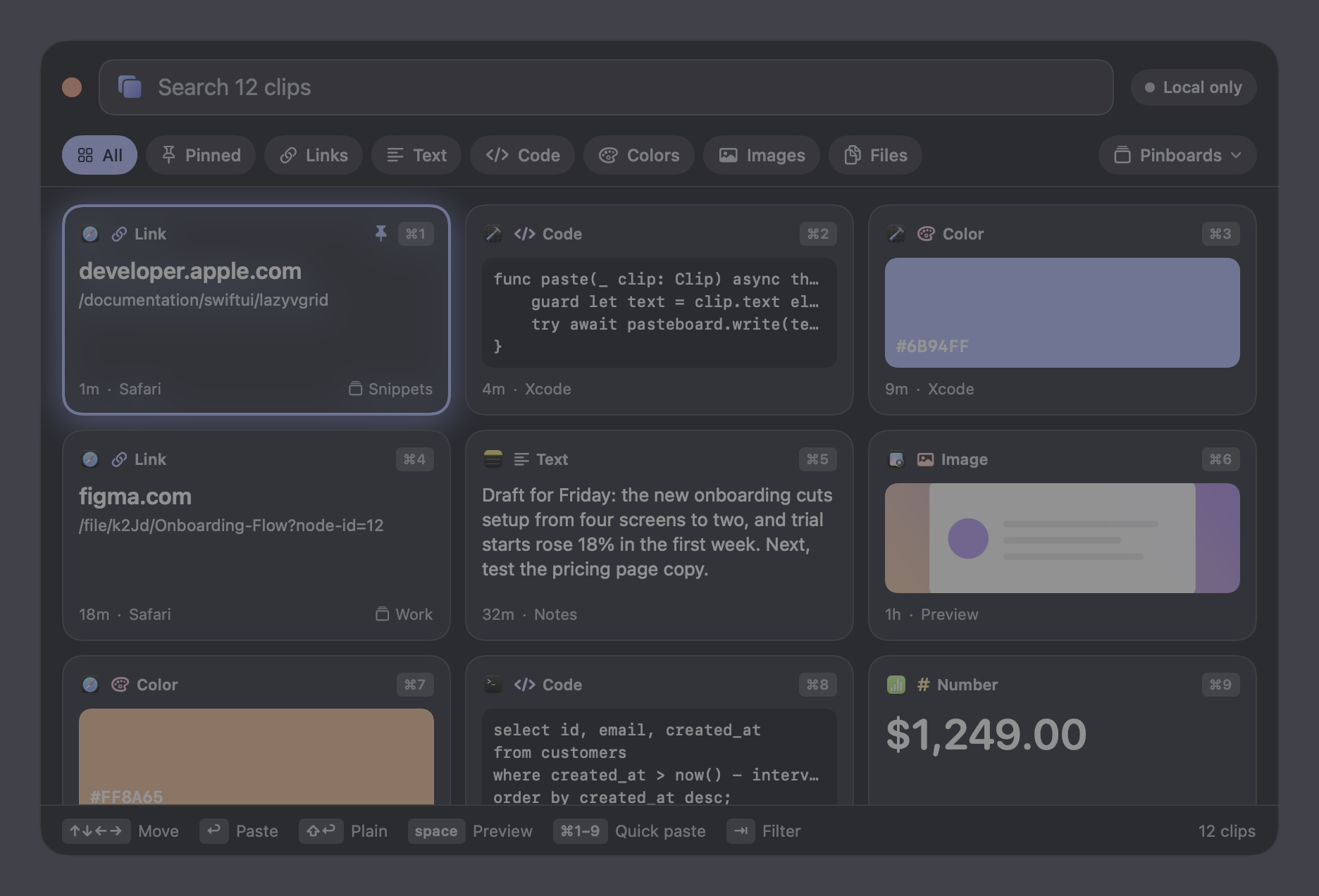
It stays out of your way
No window to manage, no Dock icon. One shortcut, from anywhere.
One keystroke
Control + V opens your history over whatever app you are in. Pick something, and it pastes straight into that app.
It knows what things are
Links, code, colors, images and files are recognised and shown differently, so you can find the one you want by looking instead of reading.
Search that finds it
Full-text search across everything you have copied, instantly, however long the history gets.
Pinboards
Keep the snippets you reuse. Pinned items never expire, and they sync to your other devices too.
On your iPhone
Copy on the Mac, paste on the phone about a second later. There is a keyboard and a share extension so it works inside other apps.
Nothing to configure
It starts working the moment you install it. Sync is the only thing that needs an account.
We cannot read your clipboard
That is a technical fact, not a promise in a policy. Your clipboard is encrypted on your device before it is sent anywhere.
Encrypted end to end
Your passphrase becomes a key with Argon2id, on your device. Everything is sealed with AES-256-GCM before it leaves. The server stores ciphertext it has no key for.
Your passphrase never leaves
It is not sent, not stored and not recoverable by us. Lose both it and your recovery key and your synced history is gone. That is the honest cost of real encryption.
Passwords are skipped
Anything a password manager or an app marks as confidential is never recorded, on any tier, whether you sync or not.
Local unless you say otherwise
With no account, nothing leaves your Mac. No telemetry, no analytics, no account required. Crash reports exist but are off until you switch them on.
Pricing
Free forever on one Mac. Pay when you want it everywhere.
- Your last 50 clips on one Mac
- Search, pinboards and previews
- Passwords always skipped
- No sync
- Only the latest 50 shown
- Unlimited history
- Encrypted sync to iPhone and other Macs
- Pinboards synced everywhere
- Everything in Free
Already using it? Subscribe from your account.
The trial unlocks everything for 14 days and does not ask for a card. Payments are handled by Paddle, who are the merchant of record.
Windows is next
Mac and iPhone work today. A Windows app is being built. Leave your email and you will hear once, when it is ready.
Questions
Do you store my clipboard?
Only if you turn on sync, and only as ciphertext we cannot open. With no account, nothing leaves your Mac at all.
What happens if I stop paying?
The app keeps working and nothing is deleted. Sync stops, and the app shows your most recent 50 clips plus anything pinned. The older ones stay on your Mac and reappear if you subscribe again.
Do images and files sync?
Not yet. They are kept on the device that copied them. Text and rich text sync. Images are large and frequent, and we would rather get the cost model right than hand you a surprise.
What if I forget my passphrase?
You get a recovery key when you set it up, and that is the only way back in. We cannot reset it, because we never had it. Keep the recovery key somewhere safe.
Is it on the Mac App Store?
No. It needs Accessibility permission to paste into the app you were using, which sandboxed App Store apps cannot have. It is notarized by Apple and downloads directly.